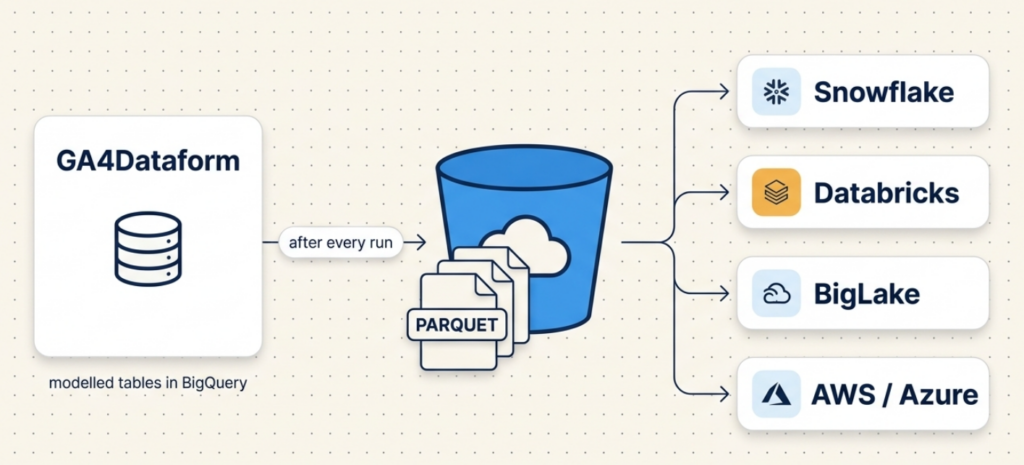
If your stack doesn’t end with BigQuery, getting GA4Dataform’s modelled tables to where you actually work has meant doing the plumbing yourself. As of Premium v2.2.6 you don’t have to. After every run, GA4Dataform can write your output tables to a Google Cloud Storage bucket as partitioned Parquet – query them in place from Snowflake, Databricks or BigLake, or move them on to AWS, Azure, or any Parquet-aware lakehouse. There’s no extraction pipeline to hand-build.
The workaround we’re retiring
Until now, teams whose warehouse wasn’t BigQuery had two options, and neither was good.
The first was to hand-roll EXPORT DATA statements to push each table out of BigQuery yourself – a parallel set of jobs to write, schedule, monitor and keep in step with the model every time the schema moved.
The second was worse: rebuild the whole GA4Dataform model in dbt inside your own warehouse. That throws away the entire point – the flattened, documented, business-ready events, sessions and transactions tables you came here for – and replaces it with months of work you now own forever.
Both exist only because the data was stuck in the wrong place. So we moved the data.
What it does
Turn it on, and at the end of each run GA4Dataform writes your selected output tables to a GCS bucket as Parquet. Parquet is the default and recommended format – columnar, compressed, and readable by essentially every modern engine. The files land partitioned by event_date, so downstream tools can prune by date instead of scanning everything.
The layout in the bucket looks like this:
gs://your-bucket/ga4dataform/<your_output_dataset>/ga4_events/
  event_date=2024-04-01/
    data-0000.parquet
    data-0001.parquet
  event_date=2024-04-02/
    data-0000.parquet
  ...
Each object is a few MB (depending on your data volume) of compressed Parquet – small enough to load incrementally, partitioned enough to query selectively.
Turning it on
Export is opt-in and configured with global variables, with per-module overrides if you only want some tables out. The two you’ll set first:
GCS_EXPORT_ENABLED: "true"          # master switch
GCS_EXPORT_BUCKET: "my-ga4-export"  # bucket name only - no gs://, no trailing slash
From there you can scope the export per module rather than shipping the whole model. The prerequisites – bucket, permissions for the Dataform service account, and the per-module settings – are written up in full in the guide.
👉 Export to GCS – full guide in the docs
Querying it downstream
Once the Parquet is in the bucket, it’s just files – consume them however your platform prefers:
- Snowflake: point an external stage / external table at the bucket prefix.
- Databricks / Spark: read the path directly; the
event_datepartitions are picked up automatically. - BigLake: register the bucket as a BigLake table and keep governing it from BigQuery.
- AWS / Azure / anything else: copy the objects across and load them like any other Parquet.
The data stays modelled. You’re loading finished events, sessions and transactions tables – not raw GA4 that you then have to flatten and clean a second time.
Does the export match the source?
Yes – and that was a release requirement, not an afterthought. We ran a row-for-row parity check between the BigQuery tables and the exported Parquet: exact match. What’s in the bucket is what’s in the model.
A note on cost
Two honest line items. The export runs as BigQuery extract jobs, so it processes additional data at each run. And the Parquet then lives in Cloud Storage, which costs storage like any bucket. Both are modest at usual GA4 scale and far below the cost of maintaining a second copy of the model – but they’re real, so plan for them.
Availability
Export to Google Cloud Storage is available now in GA4Dataform Premium (v2.2.6). It’s opt-in – existing installs are untouched until you set the variables. Full setup is in the docs guide.