
GA4Dataform runs and premodels GA4 data into a Google Cloud Storage bucket as Parquet. Query them in place from Snowflake, Databricks or BigLake, or move them on to AWS, Azure or any lakehouse. No extraction pipeline to hand-build.
Part of GA4Dataform Premium. Off by default: set two variables, and from then on the export just runs with your pipeline.
The GA4 raw export only lands in BigQuery, and until now GA4Dataform’s modelled tables lived there too. Teams running Snowflake, Databricks, Microsoft Fabric or a data lake had two options: hand-roll EXPORT DATA jobs and keep them in step with every schema change, or rebuild the whole model in dbt and own that work forever.
Both exist because the data was stuck in the wrong place. So we moved the data.
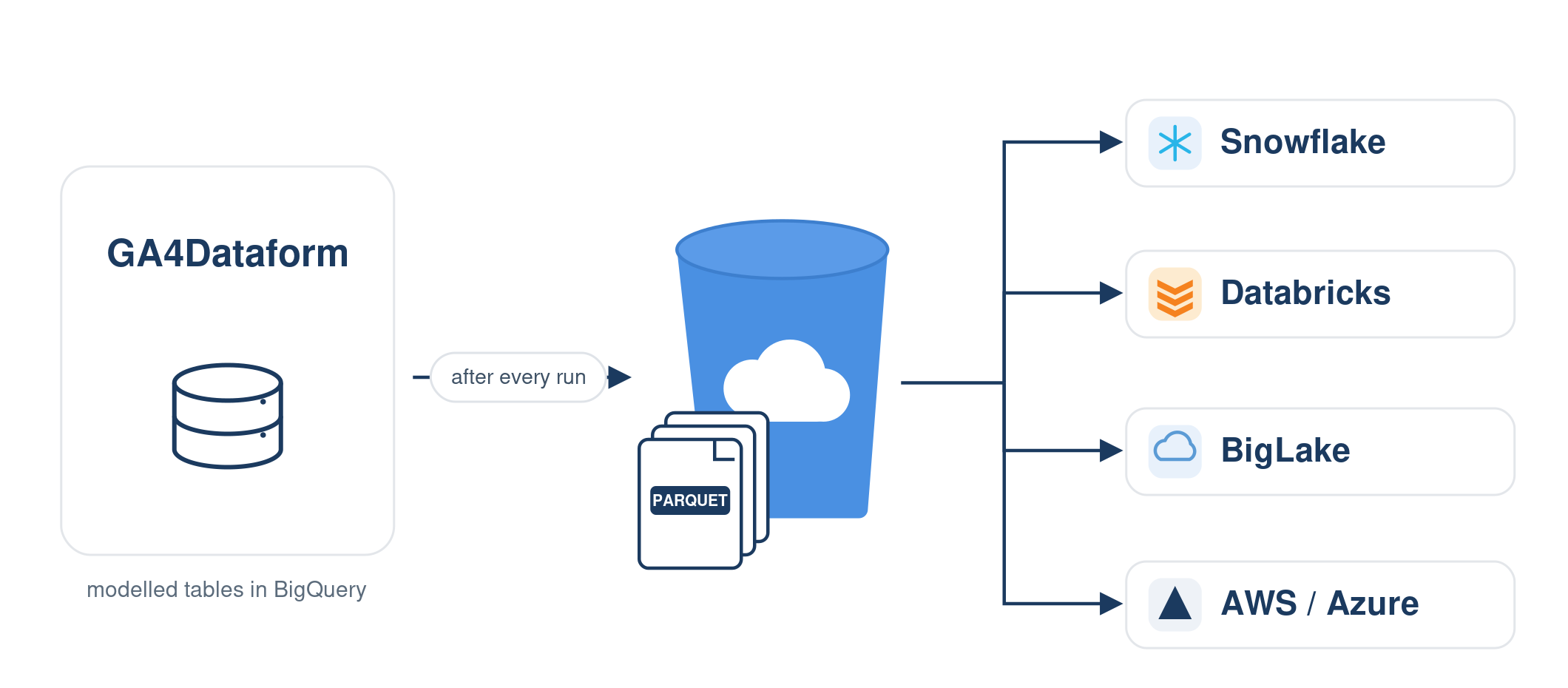

Enable the export with two variables and it becomes part of the pipeline itself: right after a table finishes building, its rows are written to your bucket. Incremental tables export only the partitions that run touched, so the bucket stays in step with the model without re-shipping history every day.
The export is best-effort by design: a wrong bucket or a missing permission surfaces as a failed export job, never as a broken pipeline.
Tables land as ZSTD-compressed Parquet in hive-partitioned folders, one file set per date under a session_date=YYYY-MM-DD/ path. That layout is recognised natively by Snowflake external tables, BigLake, Spark and DuckDB, so downstream tools prune by date instead of scanning everything. Paths are namespaced by dataset, so multiple properties can share one bucket without colliding.


Point a Snowflake external table or stage at the bucket prefix and the date partitions are picked up from the folder names. Databricks and Spark read the path directly. BigLake registers the files back into BigQuery governance. Microsoft Fabric and DuckDB read hive-partitioned Parquet out of the box, and for Redshift or Synapse you copy the objects to S3 or Azure and load them like any other Parquet.
What you load is the finished model: events, sessions and transactions tables, not raw GA4 you have to flatten a second time.
Before release we ran a parity check between the BigQuery tables and the exported Parquet: 82,788 rows compared, exact match. What’s in the bucket is what’s in the model, so the numbers downstream reconcile with what you’d see in BigQuery.


By default only output tables are exported, and you can exclude tables or enable the export per module, so you ship what you consume downstream and nothing else. The cost is two honest line items: BigQuery processing for the export jobs and standard Cloud Storage for the files. Both are modest at usual GA4 scale, the jobs are labelled so you can track them, and a lifecycle rule on the bucket keeps storage to the window you actually need.
The export is plain BigQuery EXPORT DATA running under your own service account. No connector subscription, no third-party ETL tool in the path, no credentials leaving your project. If you want a set-and-forget feed from Google Analytics into the rest of your platform, the moving parts are: your pipeline, your bucket.

Bucket regions, service account permissions, what to export and what to skip: if you’d rather talk it through, reach out and a human will answer. The full guide covers setup end to end.

Yes. Enable the export and your modelled GA4 tables land in a Cloud Storage bucket as hive-partitioned Parquet. Create a Snowflake external table or stage over the bucket prefix and the date partitions are recognised from the folder names. No connector, no third-party pipeline.
Databricks and Spark read the bucket path directly. Microsoft Fabric and DuckDB read hive-partitioned Parquet natively. BigLake registers the files back into BigQuery. For Redshift or Synapse, copy the objects to S3 or Azure storage and load them as Parquet.
Your GA4Dataform output tables (events, sessions, transactions and the module outputs) as ZSTD-compressed Parquet, partitioned by date. By default only output tables are exported; you can also include intermediate layers, exclude specific tables, or enable it per module.
Yes. The export runs as a step appended to each table build, so it fires with every pipeline run. Incremental tables export only the partitions that run processed; full-refresh tables re-export in full. A release parity check compared 82,788 rows between BigQuery and the Parquet: exact match.
Two line items on top of your normal pipeline: BigQuery processing for the export jobs and Cloud Storage for the files. Both are modest at usual GA4 scale. The jobs are labelled and visible in BigQuery job history and the GCP Cost Monitoring module, and a lifecycle rule on the bucket can cap storage to a rolling window.
GA4Dataform Premium, a bucket in the same region as your datasets, and write access for the service account. Then two variables in workflow_settings.yaml: GCS_EXPORT_ENABLED and GCS_EXPORT_BUCKET. The guide walks through it, or talk to a human.